All images and text on this page are the exclusive copyright of the author, Zeb Beadle, and are published here with his kind permission. At NAB this year I walked the floor looking for the next new thing for a…
To summarize my early years in the dark ages, it went like this… I never did find myself surrounded by beautiful models taking their clothes off. But my career path did take me down the next best road: sports. I was fortunate enough to work for the United States Ski Team and many other good clients. By the time my still cameras became Digital SLRs, I ran the photo department at a NASCAR race track for five years. So I went around the world a few times and scratched out a living. All in all, a pretty good ride, but the winds of change were blowing. Batteries were replacing brains and technology was compensating for a lack of talent. The sky wasn’t falling but the day rates were. It was time to change or die. Extinction was not going to happen to me.
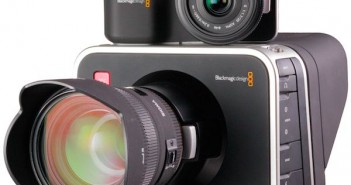
REDs for the rest of us? The $1995 Blackmagic Cinema Camera and $995 Blackmagic Pocket Cinema Camera are interchangeable-lens, single-sensor cameras with raw recording capability, capturing wide-dynamic-range, log-encoded images to CinemaDNG files. They also record ProRes422(HQ) and (for the Cinema…
There are 28 things an assistant is supposed to do to this camera before every take. In practice there are really about ten that absolutely need to be done every single time, but miss one and you’ve killed a shot… or maybe a series of shots on the same roll of film. In spite of this some of the greatest movies in history were shot on the Bell & Howell 2709 by cinematographers and their crews who knew the camera’s limitations and worked within them… and every once in a while found ways to push themselves a little further. In this sense the FS700 is equally capable: if you know what it can do and use it for what it’s good for, you’ll make some amazing images. The trick is know where you can’t cut corners.
When choosing a tripod the range of models available is confusing and baffling. There are so many different tripod weights, payloads and heights to choose from, so it can be difficult. Also while there is such a thing as a good all round tripod (as we shall se in a bit) there is also no such thing as one tripod that will be perfect for every shoot. The most important thing to consider when choosing a tripod is the payload that it will need to carry. This is the total weight of the camera, lens, batteries as well as any support equipment like rods and rails or monitors attached to the camera. Don’t underestimate how heavy this lot can get. You will want a tripod that can comfortably carry the payload you have, you never want to be right on the upper limit.
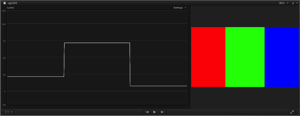
Proper exposure in HD is not always easy. Meter readings don’t always match what the camera sees. Zebras tell us where highlights are clipped but that’s about it. False color gives us broad stroke references… but the most useful tool overall is the waveform monitor. The problem is that there are two kinds: both are extremely useful, but for completely different things.
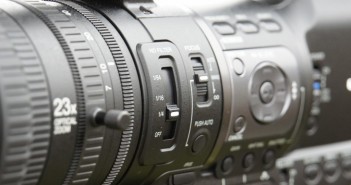
The HM650 really is a very clever camera, packed full of features that make it a great choice for news shooters. It has multiple codec and recording options, great for when you need to pool or share media. It has WiFi and 3G/4G connectivity via a USB host port where you can add wireless dongle. Brilliant for uploading material via ftp or (via a future firmware update) streaming your footage live. It has a 23x zoom lens, so it offers both a wide angle field of view for press conferences, color shots and GV’s as well as a long telephoto range for capturing those distant stories behind the police lines or security barriers.
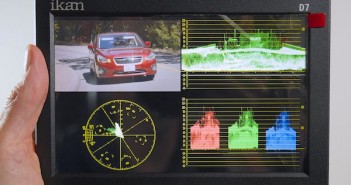
Ikan’s D7w is a 7” field monitor with SDI and HDMI inputs, 1080p compatibility, and a variety of useful display modes: false color, clipping guide, pixel-for-pixel mode, focus peaking, waveform monitor (WFM), RGB parade, vectorscope, and more. At a mere $1300, it looks like an incredible bargain. Is it? I took the plunge; here‘s what I found. Ikan showed an interesting lineup of affordable, good-looking monitors at NAB 2013. At Cine Gear Expo LA 2013 in early June, they were offering several of those monitors at show-special prices. I took a punt on a D7w, which had been enticing me since NAB: I’m in need of a decent set of engineering ‘scopes for HD work, and the D7w looked like a great way to get ‘em on the cheap.
When Rubber Monkey Software of New Zealand asked me to review their filmConvert software, it occurred to me that this was an opportunity to ask some deeper questions about film stock emulation products that never seem to get asked: not just “how,” but “why?” Rubber Monkey software is based in New Zealand. Lance Lones, one of their principals who has a strong background in visual effects as well as color technology, took a lot of time to answer my emailed questions in great detail, for which I am truly thankful. My questions are in bold, followed by Lance’s responses.
One of the dirty little secrets of the film industry is that, historically, no one has made a truly neutral ND filter. In theory ND filters cut all visible light equally, but the sad reality is that they all shift color a bit. Some go a bit cool, some turn magenta… they all tend to shift in one direction or another depending on the brand. A company by the name of Mitomo claims to have made a perfectly neutral ND filter that also cuts IR on every camera made. This is a spectacular claim and I was naturally skeptical when I first heard of this product. There’s only way to find out if this is true, so read on…